> ## Documentation Index
> Fetch the complete documentation index at: https://docs.haunt.site/llms.txt
> Use this file to discover all available pages before exploring further.
# Fake Permissions
> Restrict server moderators to use commands through Haunt
Check out the available permissions that Haunt provides for fake permissions [here](/resources/permissions).
Fake permissions can only be granted by the **server owner**.
### What are Fake Permissions?
Fake permissions allow you grant **roles** access to Haunt's commands under a specific **permission** without needing to give them any dangerous permissions.
This is useful incase any one of your moderators decides to go rogue in your server.
### What's an Example?
Whenever a role is granted a fake permission for example `manage roles`, Anyone with that role can use commands from Haunt that have the `manage roles` permission.
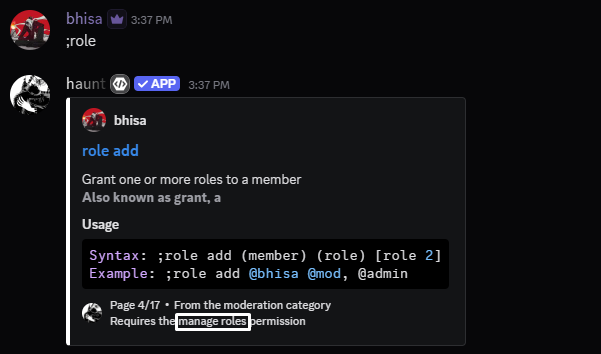 ### How do I setup fake permissions?
```javascript Syntax theme={null}
;fake grant (role) (permission)
```
```javascript Example theme={null}
;fake grant @admin kick members
```
```javascript Syntax theme={null}
;fake revoke (role) (permission)
```
```javascript Example theme={null}
;fake revoke @admin manage roles
```
You can optionally specify a role to only view the fake permissions of that role.
```javascript Syntax theme={null}
;fake view [role]
```
```javascript Example theme={null}
;fake view @admin
```
```javascript Syntax theme={null}
;fake clear
```
```javascript Example theme={null}
;fake clear
```
### Recommended Permissions
* `manage messages`: Grants anyone with the role to **manage message**s.
* `manage nicknames`: Grants anyone with the role to manage nicknames.
* `mute members`: Grants anyone with the role to mute members.
* `kick members`: Grants anyone with the role to kick members.
* `ban members`: Grants anyone with the role to kick members.
* `ban members`: Grants anyone with the role to ban members.
* `manage roles`: Grants anyone with the role to manage roles in the server.
* `manage channels`: Grants anyone with the role to manage channels in the server.
```javascript theme={null}
;fake grant (role) manage nicknames, manage messages
```
* `administrator`: Grants every **permission** to every **command** except for **server owner** commands.
```javascript theme={null}
;fake grant (role) administrator
```
* `owner`: Grants every **permission** and access to \**server owner* commands.
```javascript theme={null}
;fake grant (role) owner
```
### How do I setup fake permissions?
```javascript Syntax theme={null}
;fake grant (role) (permission)
```
```javascript Example theme={null}
;fake grant @admin kick members
```
```javascript Syntax theme={null}
;fake revoke (role) (permission)
```
```javascript Example theme={null}
;fake revoke @admin manage roles
```
You can optionally specify a role to only view the fake permissions of that role.
```javascript Syntax theme={null}
;fake view [role]
```
```javascript Example theme={null}
;fake view @admin
```
```javascript Syntax theme={null}
;fake clear
```
```javascript Example theme={null}
;fake clear
```
### Recommended Permissions
* `manage messages`: Grants anyone with the role to **manage message**s.
* `manage nicknames`: Grants anyone with the role to manage nicknames.
* `mute members`: Grants anyone with the role to mute members.
* `kick members`: Grants anyone with the role to kick members.
* `ban members`: Grants anyone with the role to kick members.
* `ban members`: Grants anyone with the role to ban members.
* `manage roles`: Grants anyone with the role to manage roles in the server.
* `manage channels`: Grants anyone with the role to manage channels in the server.
```javascript theme={null}
;fake grant (role) manage nicknames, manage messages
```
* `administrator`: Grants every **permission** to every **command** except for **server owner** commands.
```javascript theme={null}
;fake grant (role) administrator
```
* `owner`: Grants every **permission** and access to \**server owner* commands.
```javascript theme={null}
;fake grant (role) owner
```