> ## Documentation Index
> Fetch the complete documentation index at: https://docs.haunt.site/llms.txt
> Use this file to discover all available pages before exploring further.

# Valorant

> Connect haunt to your valorant account.

<Note>Haunt's prefix is set to `;` by default.</Note>
<Info>Use `;prefix set [character]` to change the prefix for your server.</Info>

## Authorizing your account

<p>
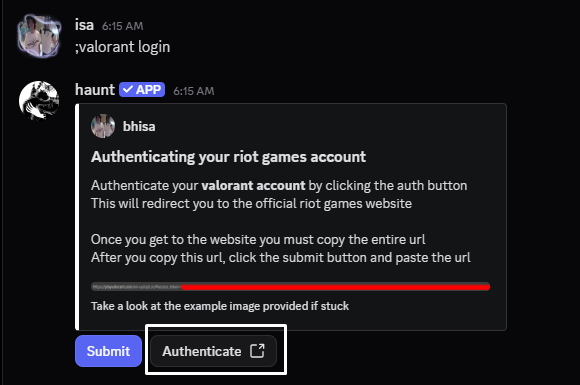
  Get started by using the `valorant login` command.<br />
  If you don't have a valorant account, <a href="https://authenticate.riotgames.com/">Create one here</a>.<br />
</p>

<p>
  Upon using the command you should see an embed with 2 buttons.<br />
  The button you want to start with is **authenicate**.<br />
</p>

<Frame>
  <img src="https://mintcdn.com/haunt-74016d1b/nUNiDQiSAZiWu6Db/images/integrations/valorant/login.png?fit=max&auto=format&n=nUNiDQiSAZiWu6Db&q=85&s=5b3f278c4bb532738244bca6497205de" width="580" height="385" data-path="images/integrations/valorant/login.png" />
</Frame>

<p>
  This will take you to the official riot games website.<br />
  If you're not logged into the website, you will have to do that.<br />
</p>

<Frame>
  <img src="https://mintcdn.com/haunt-74016d1b/nUNiDQiSAZiWu6Db/images/integrations/valorant/copy.png?fit=max&auto=format&n=nUNiDQiSAZiWu6Db&q=85&s=ae17f6d7cde0eee659590942362d52a0" width="1387" height="40" data-path="images/integrations/valorant/copy.png" />
</Frame>

<p>
  From here you will have to copy the **ENTIRE** url, Leaving any details out could prevent you from some of the commands.<br />
</p>

<p>
  After copying the url needed, you can use the submit button.<br />
  Upon pressing the button will bring up this popup, You want to copy the url into there.
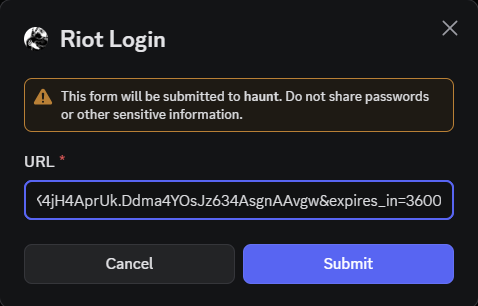
</p>

<Frame>
  <img src="https://mintcdn.com/haunt-74016d1b/nUNiDQiSAZiWu6Db/images/integrations/valorant/submit.png?fit=max&auto=format&n=nUNiDQiSAZiWu6Db&q=85&s=b762155046ab8ffd5157397e1778cb81" width="478" height="306" data-path="images/integrations/valorant/submit.png" />
</Frame>

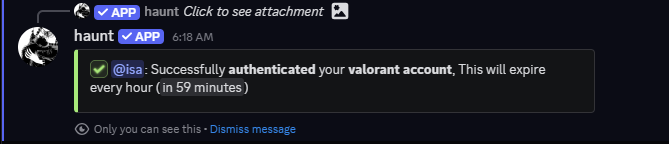
<p>
  If everything comes out correct, You should see this message!<br />
</p>

<Frame>
  <img src="https://mintcdn.com/haunt-74016d1b/nUNiDQiSAZiWu6Db/images/integrations/valorant/authenicated.png?fit=max&auto=format&n=nUNiDQiSAZiWu6Db&q=85&s=6df5a1e2079c7f5ae4410ebf0479ded2" width="669" height="144" data-path="images/integrations/valorant/authenicated.png" />
</Frame>

## How can I check when my login will expire?

<p>
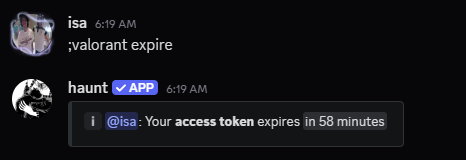
  You can check when your account's login session is about to expire with the `valorant expire` command!<br />
</p>

```js theme={null}
;valorant expire
```

<Frame>
  <img src="https://mintcdn.com/haunt-74016d1b/nUNiDQiSAZiWu6Db/images/integrations/valorant/expires.png?fit=max&auto=format&n=nUNiDQiSAZiWu6Db&q=85&s=ccea3811ff3dadc03904fd361a7db4e8" width="466" height="160" data-path="images/integrations/valorant/expires.png" />
</Frame>

## What can I do now?

<p>
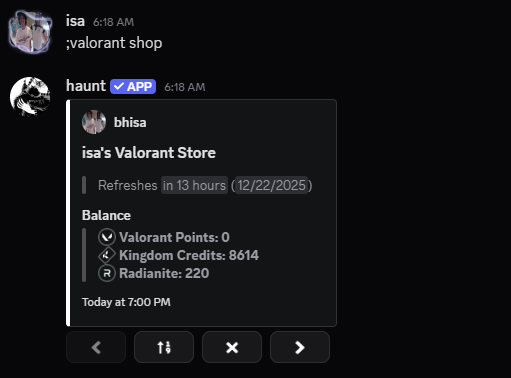
  You can check out your daily shop with the `valorant shop` command!<br />
</p>

<Frame>
  <img src="https://mintcdn.com/haunt-74016d1b/nUNiDQiSAZiWu6Db/images/integrations/valorant/shop.png?fit=max&auto=format&n=nUNiDQiSAZiWu6Db&q=85&s=a71429be94f02d572414405c2118f917" width="511" height="378" data-path="images/integrations/valorant/shop.png" />
</Frame>

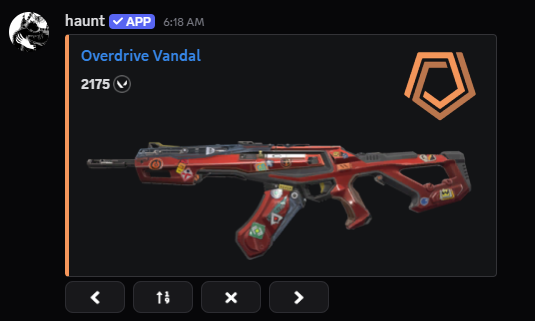
<p>
  This will show what's currently in the shop for the day as below.<br />
</p>

<Frame>
  <img src="https://mintcdn.com/haunt-74016d1b/nUNiDQiSAZiWu6Db/images/integrations/valorant/example.png?fit=max&auto=format&n=nUNiDQiSAZiWu6Db&q=85&s=e5e291cabed1e9f05e3755d3b7bd1455" width="535" height="321" data-path="images/integrations/valorant/example.png" />
</Frame>

## What about my nightmarket?

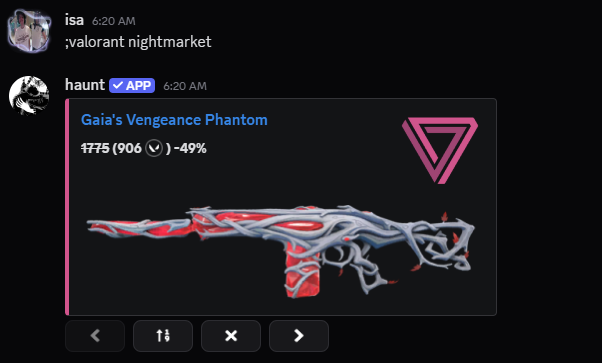
<p>
  You can also check your nightmarket with the `valorant nightmarket` command!<br />
</p>

<Frame>
  <img src="https://mintcdn.com/haunt-74016d1b/nUNiDQiSAZiWu6Db/images/integrations/valorant/night-market.png?fit=max&auto=format&n=nUNiDQiSAZiWu6Db&q=85&s=c6dbfc3edbe6de04b48df4bc3a282376" width="602" height="363" data-path="images/integrations/valorant/night-market.png" />
</Frame>

## Can I do anything without logging in?

<p>
  Short Answer, Yes you can!<br />
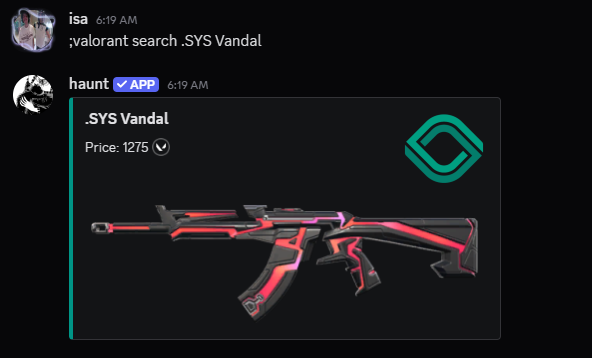
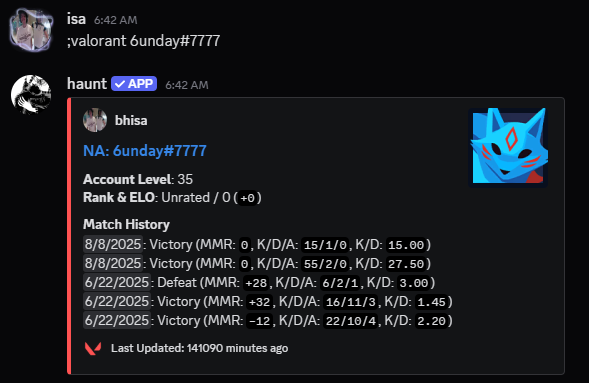
  You have 2 commands you can use which are `valorant search` and just `valorant`<br />
  Valorant search looks up a cosmetic (.SYS Vandal for example) and just `valorant` looks up user stats from a player.
</p>

<AccordionGroup>
  <Accordion title="Search for a cosmetic">
    <CodeGroup>
      ```javascript Syntax theme={null}
      ;valorant search (cosmetic name)
      ```

      ```javascript Example theme={null}
      ;valorant search .SYS Vandal
      ```
    </CodeGroup>

    <Frame>
      <img src="https://mintcdn.com/haunt-74016d1b/nUNiDQiSAZiWu6Db/images/integrations/valorant/search.png?fit=max&auto=format&n=nUNiDQiSAZiWu6Db&q=85&s=f98d57990c558e9f86702f7b44cd0835" width="592" height="358" data-path="images/integrations/valorant/search.png" />
    </Frame>
  </Accordion>

  <Accordion title="Search for a player's stats">
    <CodeGroup>
      ```javascript Syntax theme={null}
      ;valorant (username)
      ```

      ```javascript Example theme={null}
      ;valorant 6unday#7777
      ```
    </CodeGroup>

    <Frame>
      <img src="https://mintcdn.com/haunt-74016d1b/nUNiDQiSAZiWu6Db/images/integrations/valorant/stats.png?fit=max&auto=format&n=nUNiDQiSAZiWu6Db&q=85&s=bad53c4911a0257a85279411a10d1c7f" width="589" height="383" data-path="images/integrations/valorant/stats.png" />
    </Frame>
  </Accordion>
</AccordionGroup>