> ## Documentation Index
> Fetch the complete documentation index at: https://docs.haunt.site/llms.txt
> Use this file to discover all available pages before exploring further.
# Birthday
> Learn how to setup birthday messages or set your birthday with Haunt!
## Setting your Birthday
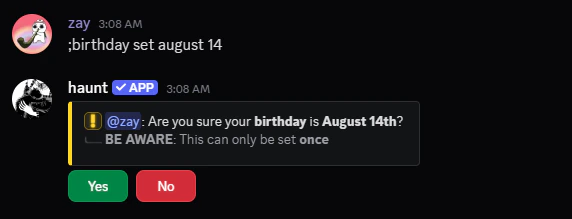
You can start with the `birthday set` command.
You can set your birthday by following the examples below!
Make sure to set the **correct birthday** since you can only do it **once**.
```javascript Syntax theme={null}
;birthday set (date)
```
```javascript Example theme={null}
;birthday set 8/14
```
```javascript Example 2 theme={null}
;birthday set august 14
```
```javascript Example With Suffix theme={null}
;birthday set august 14th
```
Before you set your birthday, Make sure to confirm it's the correct date.
 ## Viewing your Birthday
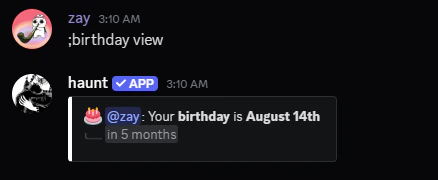
View you or another member's birthday by using the `birthday view` command!
```javascript Syntax theme={null}
;birthday view [member]
```
```javascript Example theme={null}
;birthday view
```
 ### Viewing every member's birthday
View every person's birthday that's in your server!
```javascript Syntax theme={null}
;birthday list
```
```javascript Example theme={null}
;birthday list
```
## Configuring Haunt's Birthday Settings
Learn how to setup Haunt's birthday settings for celebrating your member's birthday!
Start with the `birthday enable` command.
```javascript Syntax theme={null}
;birthday enable
```
```javascript Example theme={null}
;birthday enable
```
### Setting a Birthday Role
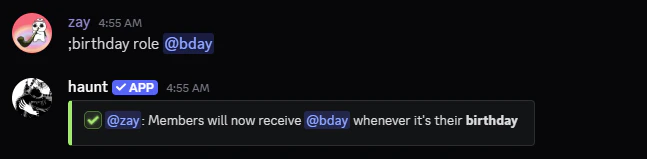
Start with the `birthday role` command.
This role will be given to members when it's their birthday!
```javascript Syntax theme={null}
;birthday role (role)
```
```javascript Example theme={null}
;birthday role @bday
```
 ### Setting a Birthday Message
You can use [**Embeds**](/resources/embeds/scripting) and [**Variables**](/resources/embeds/variables) while creating a custom message.
### Setting a Birthday Message
You can use [**Embeds**](/resources/embeds/scripting) and [**Variables**](/resources/embeds/variables) while creating a custom message.
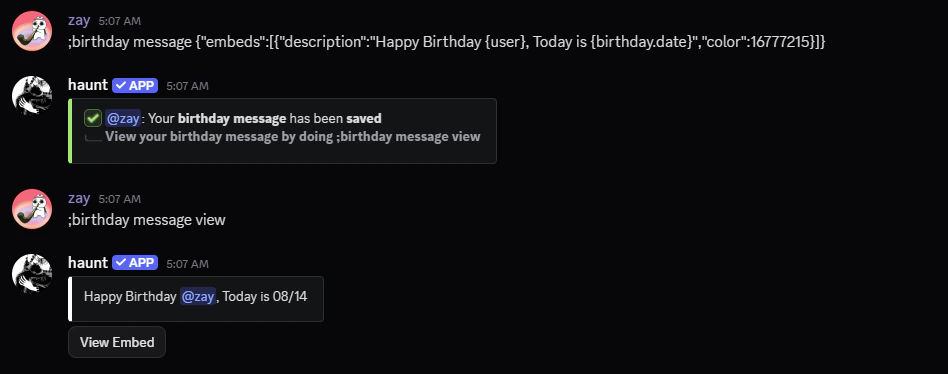
Start with the `birthday message` command.
This will send a custom message when it's a member's birthday!
```javascript Syntax theme={null}
;birthday message (text)
```
```javascript Example theme={null}
;birthday message Happy Birthday {user}, Today is {birthday.date}
```
```javascript Example with Embeds theme={null}
;birthday message {"embeds":[{"description":"Happy Birthday {user}, Today is {birthday.date}","color":16777215}]}
```
 ### Setting a Birthday Channel
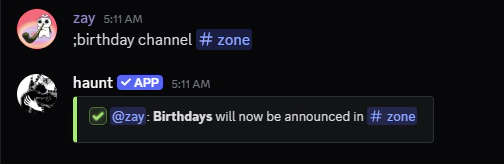
Start with the `birthday channel` command.
This sets the **channel** to send the **birthday messages**
```javascript Syntax theme={null}
;birthday channel (channel)
```
```javascript Example theme={null}
;birthday channel #birthdays
```