> ## Documentation Index
> Fetch the complete documentation index at: https://docs.haunt.site/llms.txt
> Use this file to discover all available pages before exploring further.

# Temporary Channels

> Allow members of your server to create their own temporary voice channels.

<Note>Haunt's prefix is set to `;` by default.</Note>
<Info>Use `;prefix set [character]` to change the prefix for your server.</Info>

## Setting up Voice Channels

To setup custom temporary voice channels run the `temporary setup` command.

<CodeGroup>
  ```javascript Syntax theme={null}
  ;temporary setup
  ```

  ```javascript Example theme={null}
  ;temporary setup
  ```
</CodeGroup>

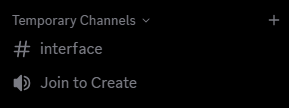
Running this command will create 3 channels, **Temporary Channels**, **Join to Create** and **Interface**.

<Frame>
  <img src="https://mintcdn.com/haunt-74016d1b/M4ty2khLdDVzJYfq/images/configuration/temporary/channels.png?fit=max&auto=format&n=M4ty2khLdDVzJYfq&q=85&s=918923586cce7f58602f281a5f1d4aa5" width="289" height="108" data-path="images/configuration/temporary/channels.png" />
</Frame>

## Learning about the Interface

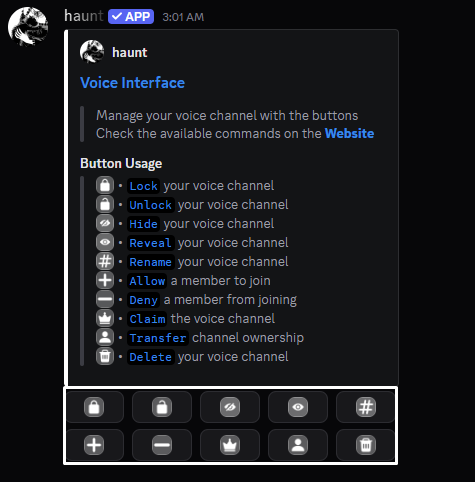
The interface will act as a remote to control your temporary **voice channel**.
<Frame>
  <img src="https://mintcdn.com/haunt-74016d1b/M4ty2khLdDVzJYfq/images/configuration/temporary/interface.png?fit=max&auto=format&n=M4ty2khLdDVzJYfq&q=85&s=5ed9c8d993f1849026c12276fe02e6f3" width="475" height="482" data-path="images/configuration/temporary/interface.png" />
</Frame>

<p>
  You don't have to entirely use the interface to control your voice channel.<br />
  You can use the commands provided below or manage it using discord's channel settings.<br />
  You can also find the **commands** for **temporary voice channels** [here](https://haunt.site/commands#category=temporary%20channels).
</p>

<Frame>
  <img src="https://mintcdn.com/haunt-74016d1b/M4ty2khLdDVzJYfq/images/configuration/temporary/hide.png?fit=max&auto=format&n=M4ty2khLdDVzJYfq&q=85&s=a641245654b593bf6a508c2ed8d8a3d4" width="485" height="160" data-path="images/configuration/temporary/hide.png" />
</Frame>

<AccordionGroup>
  <Accordion title="Locking your voice channel">
    Use the `temporary lock` command to **lock** your **voice channel**.

    <CodeGroup>
      ```javascript Syntax theme={null}
      ;temporary lock
      ```

      ```javascript Example theme={null}
      ;temporary lock
      ```
    </CodeGroup>
  </Accordion>

  <Accordion title="Unlocking your voice channel">
    Use the `temporary unlock` command to **unlock** your **voice channel**.

    <CodeGroup>
      ```javascript Syntax theme={null}
      ;temporary unlock
      ```

      ```javascript Example theme={null}
      ;temporary unlock
      ```
    </CodeGroup>
  </Accordion>

  <Accordion title="Hiding your voice channel">
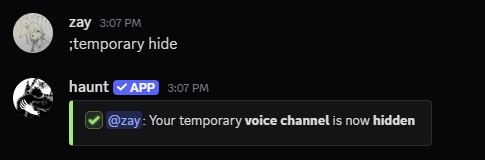
    Use the `temporary hide` command to **hide** your **voice channel**.

    <CodeGroup>
      ```javascript Syntax theme={null}
      ;temporary hide
      ```

      ```javascript Example theme={null}
      ;temporary hide
      ```
    </CodeGroup>
  </Accordion>

  <Accordion title="Revealing your voice channel">
    Use the `temporary reveal` command to **reveal** your **voice channel**.

    <CodeGroup>
      ```javascript Syntax theme={null}
      ;temporary reveal
      ```

      ```javascript Example theme={null}
      ;temporary reveal
      ```
    </CodeGroup>
  </Accordion>

  <Accordion title="Renaming your voice channel">
    Use the `temporary name` command to **rename** your **voice channel**.

    <CodeGroup>
      ```javascript Syntax theme={null}
      ;temporary name (text)
      ```

      ```javascript Example theme={null}
      ;temporary name {user.display}'s room
      ```
    </CodeGroup>
  </Accordion>

  <Accordion title="Changing your voice channel's region">
    Use the `temporary region` command to change the **region** of your **voice channel**.

    <CodeGroup>
      ```javascript Syntax theme={null}
      ;temporary region (location)
      ```

      ```javascript Example theme={null}
      ;temporary region japan
      ```
    </CodeGroup>
  </Accordion>

  <Accordion title="Changing your voice channel's status">
    Use the `temporary status` command to change the **status** of your **voice channel**.

    <CodeGroup>
      ```javascript Syntax theme={null}
      ;temporary status (text)
      ```

      ```javascript Example theme={null}
      ;temporary status music room
      ```
    </CodeGroup>
  </Accordion>

  <Accordion title="Changing the amount of members that can join your voice channel">
    Use the `temporary limit` command to change the **user limit** of your **voice channel**.

    <CodeGroup>
      ```javascript Syntax theme={null}
      ;temporary limit (number)
      ```

      ```javascript Example theme={null}
      ;temporary limit 99
      ```
    </CodeGroup>
  </Accordion>

  <Accordion title="Changing the video quality of your voice channel">
    Use the `temporary quality` command to change the **quality** of your **voice channel**.

    <CodeGroup>
      ```javascript Syntax theme={null}
      ;temporary quality (mode)
      ```

      ```javascript Example theme={null}
      ;temporary quality auto
      ```
    </CodeGroup>
  </Accordion>

  <Accordion title="Allowing a member into your voice chnanel">
    Use the `temporary allow` command to **allow** a user into your **voice channel**.

    <CodeGroup>
      ```javascript Syntax theme={null}
      ;temporary allow (user)
      ```

      ```javascript Example theme={null}
      ;temporary allow bhisa
      ```
    </CodeGroup>
  </Accordion>

  <Accordion title="Denying a member from your voice channel">
    Use the `temporary deny` command to **deny** a user from your **voice channel**.

    <CodeGroup>
      ```javascript Syntax theme={null}
      ;temporary deny (user)
      ```

      ```javascript Example theme={null}
      ;temporary deny bhisa
      ```
    </CodeGroup>
  </Accordion>

  <Accordion title="Claiming an empty voice channel">
    Use the `temporary claim` command to **claim** an empty **voice channel**.

    <CodeGroup>
      ```javascript Syntax theme={null}
      ;temporary claim
      ```

      ```javascript Example theme={null}
      ;temporary claim
      ```
    </CodeGroup>
  </Accordion>

  <Accordion title="Transfering ownership of your voice channel">
    Use the `temporary transfer` command to **transfer** ownership of your **voice channel**.

    <CodeGroup>
      ```javascript Syntax theme={null}
      ;temporary transfer (user)
      ```

      ```javascript Example theme={null}
      ;temporary transfer bhisa
      ```
    </CodeGroup>
  </Accordion>

  <Accordion title="Deleting your voice channel">
    Use the `temporary delete` command to **delete** your **voice channel**.

    <CodeGroup>
      ```javascript Syntax theme={null}
      ;temporary delete
      ```

      ```javascript Example theme={null}
      ;temporary delete
      ```
    </CodeGroup>
  </Accordion>
</AccordionGroup>

## What else can I do?

<p>
  You can setup default settings for the next time anyone creates a temporary voice channel!<br />
  Start out with the commands below!
</p>

<Frame>
  <img src="https://mintcdn.com/haunt-74016d1b/M4ty2khLdDVzJYfq/images/configuration/temporary/name.png?fit=max&auto=format&n=M4ty2khLdDVzJYfq&q=85&s=739141b2bd4a08c3a76090991d871a2e" width="601" height="155" data-path="images/configuration/temporary/name.png" />
</Frame>

<AccordionGroup>
  <Accordion title="Setting a default name">
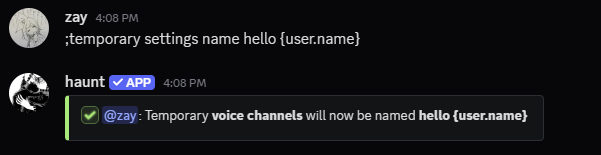
    Using the `temporary settings name` command will set every new voice channel to the **name** you set.

    <CodeGroup>
      ```javascript Syntax theme={null}
      ;temporary settings name (text)
      ```

      ```javascript Example theme={null}
      ;temporary settings name {user.name}'s room
      ```
    </CodeGroup>
  </Accordion>

  <Accordion title="Setting a default region">
    Using the `temporary settings region` command will set every new voice channel to the **region** you set.

    <CodeGroup>
      ```javascript Syntax theme={null}
      ;temporary settings region (location)
      ```

      ```javascript Example theme={null}
      ;temporary settings region auto
      ```
    </CodeGroup>
  </Accordion>

  <Accordion title="Setting a default bitrate">
    Using the `temporary settings bitrate` command will set every new voice channel to the **bitrate** you set.

    <CodeGroup>
      ```javascript Syntax theme={null}
      ;temporary settings bitrate (number)
      ```

      ```javascript Example theme={null}
      ;temporary settings bitrate (96)
      ```
    </CodeGroup>
  </Accordion>

  <Accordion title="Setting a default user limit">
    Using the `temporary settings limit` command will set every new voice channel to the **user limit** you set.

    <CodeGroup>
      ```javascript Syntax theme={null}
      ;temporary settings limit (number)
      ```

      ```javascript Example theme={null}
      ;temporary settings limit 99
      ```
    </CodeGroup>
  </Accordion>

  <Accordion title="Setting a different category">
    Using the `temporary settings category` command will set every new voice channel under the **category** you set.

    <CodeGroup>
      ```javascript Syntax theme={null}
      ;temporary settings category (category channel)
      ```

      ```javascript Example theme={null}
      ;temporary settings category voice channels
      ```
    </CodeGroup>
  </Accordion>

  <Accordion title="Resend the voice interface in new channels">
    Using the `temporary settings interface` command will resend the interface to created **voice channels**.

    <CodeGroup>
      ```javascript Syntax theme={null}
      ;temporary settings interface (choice)
      ```

      ```javascript Example theme={null}
      ;temporary settings interface yes
      ```
    </CodeGroup>
  </Accordion>

  <Accordion title="Send privated channels to another category">
    Using the `temporary settings private` command will send **privated channels** under the category you set.

    <CodeGroup>
      ```javascript Syntax theme={null}
      ;temporary settings private (category channel)
      ```

      ```javascript Example theme={null}
      ;temporary settings private invisible
      ```
    </CodeGroup>
  </Accordion>

  <Accordion title="Set a default role to give to joining members">
    Using the `temporary settings role` command will give a **role** to joining members.

    <CodeGroup>
      ```javascript Syntax theme={null}
      ;temporary settings role (role)
      ```

      ```javascript Example theme={null}
      ;temporary settings role @voice
      ```
    </CodeGroup>
  </Accordion>

  <Accordion title="Remove the default role set for joining members">
    Using the `temporary settings role remove` command will remove the **role** you set.

    <CodeGroup>
      ```javascript Syntax theme={null}
      ;temporary settings role remove
      ```

      ```javascript Example theme={null}
      ;temporary settings role remove
      ```
    </CodeGroup>
  </Accordion>
</AccordionGroup>