> ## Documentation Index
> Fetch the complete documentation index at: https://docs.haunt.site/llms.txt
> Use this file to discover all available pages before exploring further.
# Booster Roles
> Allow members that boost your server to create custom roles
## What is Booster?
Booster allows your **members** to create and customize their own role when they boost your server!
## Configuring Booster for the server
Start by using the `booster enable` command.
This will make it so boosters in the server can create their **custom roles**!
```javascript Syntax theme={null}
;booster enable
```
```javascript Example theme={null}
;booster enable
```
### Setting the Base Role
Start by using the `booster base` command.
This will make it so any custom role created will go **under** that **base role**
```javascript Syntax theme={null}
;booster base (role)
```
```javascript Example theme={null}
;booster base @under
```
### Setting the max shared roles
Using the `booster share max` comamnd sets the amount of roles that a user can share.
```javascript Syntax theme={null}
;booster share max (number)
```
```javascript Example theme={null}
;booster share max 6
```
## Creating your Custom Role
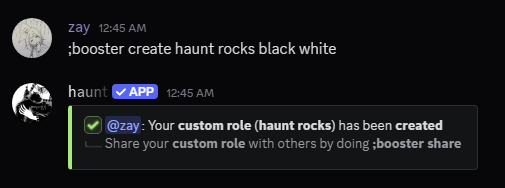
Start by creating your role with the `booster create` command.
```javascript Syntax theme={null}
;booster create (name) [color] [color 2]
```
```javascript Example theme={null}
;booster create haunt rocks black white
```
 ## Configuring your Custom Role
There are 7 subcommands you can use to configre your **custom role**.
```javascript Syntax theme={null}
;booster delete
```
```javascript Example theme={null}
;booster delete
```
```javascript Syntax theme={null}
;booster name (name)
```
```javascript Example theme={null}
;booster name zay's role
```
The **second color** is optional for **gradient roles**.
```javascript Syntax theme={null}
;booster color (color 1) [color 2]
```
```javascript Example theme={null}
;booster color blue purple
```
```javascript Syntax theme={null}
;booster mention (choice)
```
```javascript Example theme={null}
;booster mention yes
```
```javascript Syntax theme={null}
;booster icon (attachment)
```
```javascript Example theme={null}
;booster icon haunt.jpeg
```
```javascript Syntax theme={null}
;booster icon remove
```
```javascript Example theme={null}
;booster icon remove
```
## Sharing your Custom Role
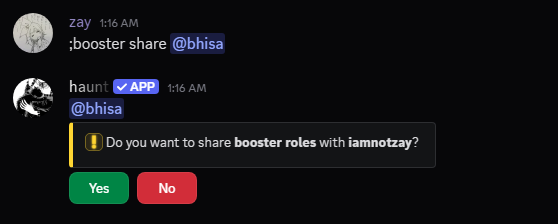
You can share your **custom role** with other **members**!
Start with the `booster share` command.
```javascript Syntax theme={null}
;booster share (member)
```
```javascript Example theme={null}
;booster share @isa
```
 ### Leaving a Shared Custom Role
Start by using the `booster share leave` command.
```javascript Syntax theme={null}
;booster share leave (member)
```
```javascript Example theme={null}
;booster share leave @isa
```
### View who you're sharing your Custom Role with
Start by using the `booster share view` command.
```javascript Syntax theme={null}
;booster share view
```
```javascript Example theme={null}
;booster share view
```
### Clear who you're sharing your Custom role with
Start by using the `booster share clear` command.
```javascript Syntax theme={null}
;booster share clear
```
```javascript Example theme={null}
;booster share clear
```