> ## Documentation Index
> Fetch the complete documentation index at: https://docs.haunt.site/llms.txt
> Use this file to discover all available pages before exploring further.

# Sticky

> Create sticky messages so haunt will keep a message relevant in a channel

<Note>Haunt's prefix is set to `;` by default.</Note>
<Info>Use `;prefix set [character]`to change the prefix for your server.</Info>

<Warning>Keep in mind that **haunt** will not send the sticky message if another bot sends a message.</Warning>

## Creating a sticky message

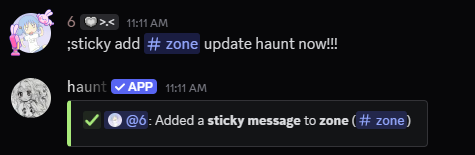
To create a sticky message, Start by using the `sticky add` command.

<CodeGroup>
  ```javascript Syntax theme={null}
  ;sticky add (channel)
  ```

  ```javascript Example theme={null}
  ;sticky add #questions
  ```
</CodeGroup>

<Frame>
  <img src="https://mintcdn.com/haunt-74016d1b/3RIDqwe00o91v-gy/images/configuration/messages/sticky/add.png?fit=max&auto=format&n=3RIDqwe00o91v-gy&q=85&s=c26cb76a0be5182bfbcc4c472b70b6fa" width="475" height="155" data-path="images/configuration/messages/sticky/add.png" />
</Frame>

## Removing a sticky message

Remove a sticky message from a channel by using the `sticky remove` command.

<CodeGroup>
  ```javascript Syntax theme={null}
  ;sticky remove (channel)
  ```

  ```javascript Example theme={null}
  ;sticky remove #questions
  ```
</CodeGroup>

<Frame>
  <img src="https://mintcdn.com/haunt-74016d1b/3RIDqwe00o91v-gy/images/configuration/messages/sticky/remove.png?fit=max&auto=format&n=3RIDqwe00o91v-gy&q=85&s=d0bb1d2bc9d6cb8903d5d3a209022e74" width="475" height="158" data-path="images/configuration/messages/sticky/remove.png" />
</Frame>

## Modifying a sticky message

<p>
  There are `2` things that you can modify for **sticky messages**.<br />
  One of them are switching the sticky message from one channel to another.<br />
  And the other is updating the sticky message for a channel.

</p>

<AccordionGroup>
  <Accordion title="Edit Channel">
    Run the `sticky edit channel` command to switch the channel.

    <CodeGroup>
      ```javascript Syntax theme={null}
      ;sticky edit channel (old channel) (new channel)
      ```

      ```javascript Example theme={null}
      ;sticky edit channel #questions #support
      ```
    </CodeGroup>
  </Accordion>

  <Accordion title="Edit Message">
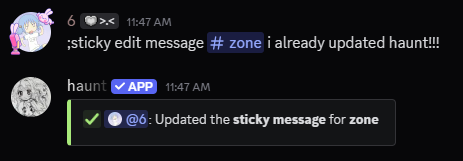
    Run the `sticky edit message` command to switch the message for that channel.

    <CodeGroup>
      ```javascript Syntax theme={null}
      ;sticky edit message (channel) (message)
      ```

      ```javascript Example theme={null}
      ;sticky edit message #questions i will answer your questions here!
      ```
    </CodeGroup>
  </Accordion>
</AccordionGroup>

## Example on how to edit sticky message channels

<Frame>
  <img src="https://mintcdn.com/haunt-74016d1b/3RIDqwe00o91v-gy/images/configuration/messages/sticky/edit-channel.png?fit=max&auto=format&n=3RIDqwe00o91v-gy&q=85&s=5acec9b364a325fa75d7273969843d70" width="471" height="158" data-path="images/configuration/messages/sticky/edit-channel.png" />
</Frame>

## Example on how to edit a sticky message
<Frame>
  <img src="https://mintcdn.com/haunt-74016d1b/3RIDqwe00o91v-gy/images/configuration/messages/sticky/edit-message.png?fit=max&auto=format&n=3RIDqwe00o91v-gy&q=85&s=6220d9da76751ecb13461e4cce4b76dd" width="463" height="161" data-path="images/configuration/messages/sticky/edit-message.png" />
</Frame>

## Related commands

<AccordionGroup>
  <Accordion title="View every sticky message">
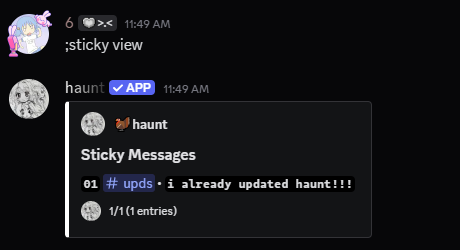
    Use the `sticky view` command to view what sticky messages have been added.

    <Frame>
      <img src="https://mintcdn.com/haunt-74016d1b/3RIDqwe00o91v-gy/images/configuration/messages/sticky/view.png?fit=max&auto=format&n=3RIDqwe00o91v-gy&q=85&s=dcb9af997620d8d2528c108372af0d72" width="460" height="250" data-path="images/configuration/messages/sticky/view.png" />
    </Frame>
  </Accordion>

  <Accordion title="Remove every sticky message">
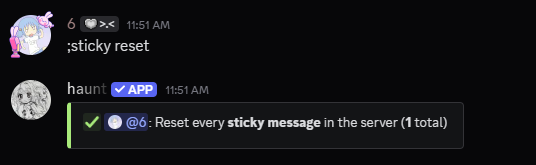
    Use the `sticky reset` command to remove every sticky message.

    <Frame>
      <img src="https://mintcdn.com/haunt-74016d1b/3RIDqwe00o91v-gy/images/configuration/messages/sticky/reset.png?fit=max&auto=format&n=3RIDqwe00o91v-gy&q=85&s=29967eaccdb617c5b9a6b910bdb1069e" width="536" height="165" data-path="images/configuration/messages/sticky/reset.png" />
    </Frame>
  </Accordion>
</AccordionGroup>
