> ## Documentation Index
> Fetch the complete documentation index at: https://docs.haunt.site/llms.txt
> Use this file to discover all available pages before exploring further.
# Response
> Create a trigger to automatically respond to a specific message.
Haunt's prefix is set to `;` by default.
Use `;prefix set [character]`to change the prefix for your server.
## Creating a new response trigger
Get started by using the `response create` command.
The **trigger** and **response** must be separated by a comma (`,`).
You can use [**Embeds**](/resources/embeds/scripting) and [**Variables**](/resources/embeds/variables) while creating a response as well.
```javascript Syntax theme={null}
;response create (trigger, response) [{flags}]
```
```javascript Example theme={null}
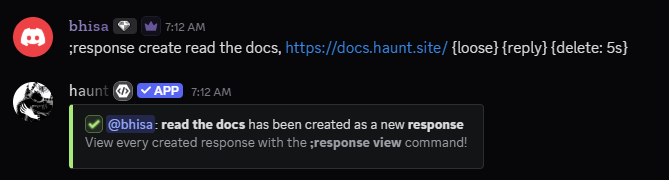
;response create read the docs, https://docs.haunt.site
;response create read the docs, {"embeds":[{"description":"read the docs {user}","color":9716547}]}
```
```javascript Flags theme={null}
;response create read the docs, https://docs.haunt.site {reply}
;response create read the docs, https://docs.haunt.site {loose}
;response create read the docs, https://docs.haunt.site {delete: 5s}
```
 ### What flags can I use with responders
Here are the flags that are available for creating responses
The `{loose}` flag will search for the trigger anywhere in the message.
### What flags can I use with responders
Here are the flags that are available for creating responses
The `{loose}` flag will search for the trigger anywhere in the message.
For example, if the trigger is `bhisa`, **haunt** will respond to `bhisa is cool`.
The `{reply}` flag will reply to the trigger message.
The `{delete}` flag will delete the response after a certain amount of time.
To use the delete flag you **HAVE** to provide a time frame, Example: `{duration: 10s}`
## Delete an existing response trigger
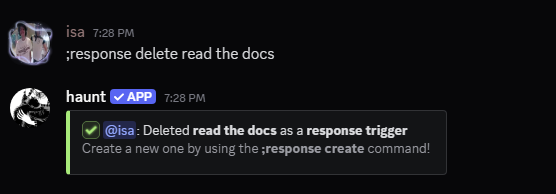
Delete an existing response trigger by using the `response delete` command.
```javascript Syntax theme={null}
;response delete (trigger)
```
```javascript Example theme={null}
;response delete read the docs
```
 ## View every existing response trigger
```javascript Syntax theme={null}
;response view [trigger]
```
```javascript Example theme={null}
;response view hi zay
```
## Remove every existing response
```javascript Syntax theme={null}
;response clear
```
```javascript Example theme={null}
;response clear
```
## Update an existing response trigger
Here are the following subcommands to update settings for a response trigger.
This command will update the message which triggers the response.
## View every existing response trigger
```javascript Syntax theme={null}
;response view [trigger]
```
```javascript Example theme={null}
;response view hi zay
```
## Remove every existing response
```javascript Syntax theme={null}
;response clear
```
```javascript Example theme={null}
;response clear
```
## Update an existing response trigger
Here are the following subcommands to update settings for a response trigger.
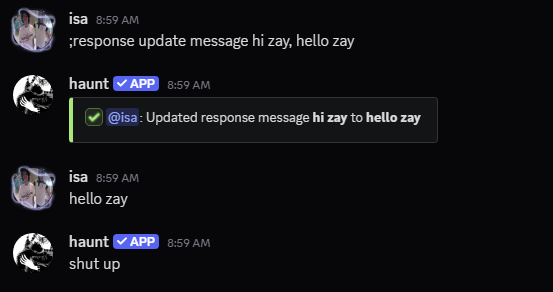
This command will update the message which triggers the response.
The **message** and the **new message** must be separated with a **comma** (`,`).
```javascript Syntax theme={null}
;response update message (message), (new message)
```
```javascript Example theme={null}
;response update message hi zay, hello zay
```
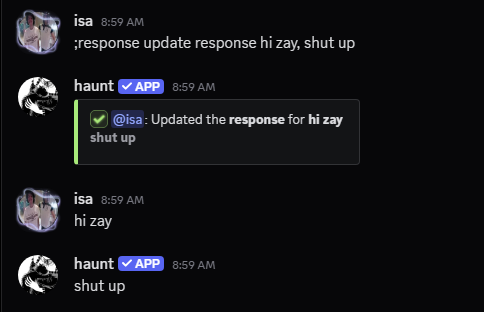
 This command will update the response that sends when it's triggered.
The **message** and the **response** must be separated with a **comma** (`,`).
```javascript Syntax theme={null}
;response update response (message), (response)
```
```javascript Example theme={null}
;response update response hi zay, shut up
```
 This command updates the loose setting for the response.
The **message** and the **choice** must be separated with a **comma** (`,`).
```javascript Syntax theme={null}
;response update loose (message), (choice)
```
```javascript Example theme={null}
;response update loose hi zay, false
```
This command updates the reply setting for the response.
The **message** and the **choice** must be separated with a **comma** (`,`).
```javascript Syntax theme={null}
;response update reply (message), (choice)
```
```javascript Example theme={null}
;response update reply hi zay, yes
```
This command updates the cooldown setting for the response.
The **message** and the **duration** must be separated with a **comma** (`,`).
```javascript Syntax theme={null}
;response update cooldown (message), (duration)
```
```javascript Example theme={null}
;response update cooldown hi zay, 5 minutes
```
This command updates the prompt setting for the response.
The **message** and the **choice** must be separated with a **comma** (`,`).
```javascript Syntax theme={null}
;response update prompt (message), (choice)
```
```javascript Example theme={null}
;response update prompt hi zay, true
```
Turning on the prompt setting repeats what you say after triggering the response.
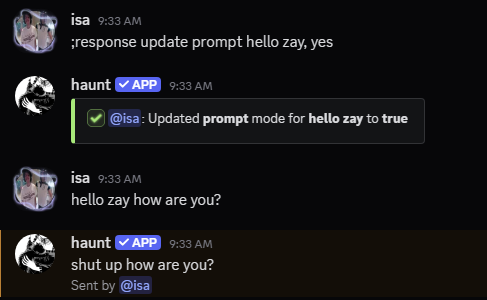 This command deletes the response that gets sent.
The **message** and the **duration** must be separated with a **comma** (`,`).
```javascript Syntax theme={null}
;response update delete (message), (duration)
```
```javascript Example theme={null}
;response update delete hi zay, 3 seconds
```
This command will delete the message that triggered the response.
The **message** and the **duration** must be separated with a **comma** (`,`).
```javascript Syntax theme={null}
;response update delete trigger (message), (duration)
```
```javascript Example theme={null}
;response update delete trigger hi zay, 3 seconds
```
This command updates the match setting for the message.
The **message** and the **match** must be separated with a **comma** (`,`).
```javascript Syntax theme={null}
;response update match (message), (start|exact|end)
```
```javascript Example theme={null}
;response update match hi zay, start
```
Start means the message trigger has to be at the start of the message.
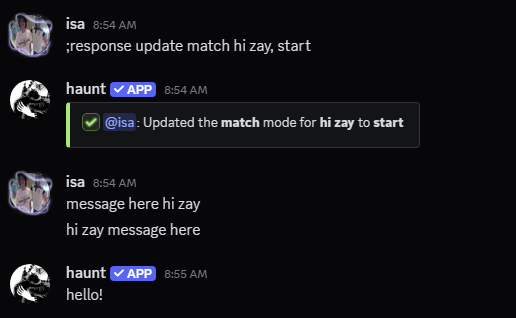 Exact makes the message trigger work as normal.
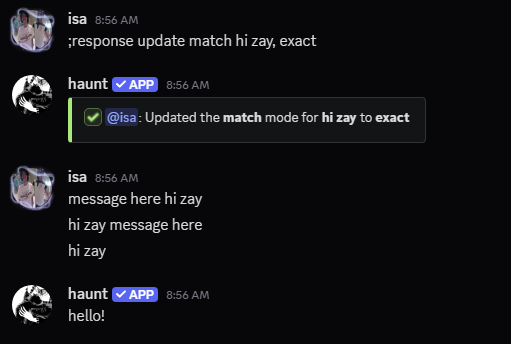 End means the message trigger has to be at the end of the message.
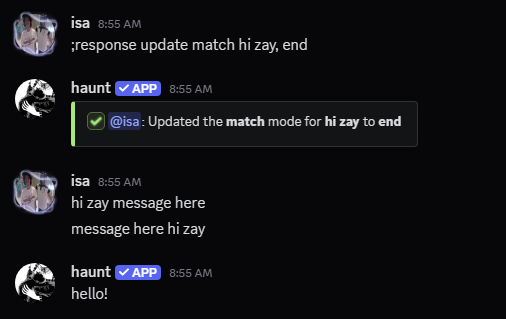 ## Restrict a response to a role
Start by using the `response role` command.
```javascript Syntax theme={null}
;response role add (message), (role)
```
```javascript Example theme={null}
;response role add hi zay, @haunt
```
The **message** and the **role** must be separated with a **comma** (`,`).
```javascript Syntax theme={null}
;response role remove (message), (role)
```
```javascript Example theme={null}
;response role remove hi zay, @haunt
```
```javascript Syntax theme={null}
;response role view
```
```javascript Example theme={null}
;response role view
```
```javascript Syntax theme={null}
;response role clear
```
```javascript Example theme={null}
;response role clear
```
## Restrict a response to a channel
Start by using the `response channel` command.
```javascript Syntax theme={null}
;response channel add (message), (channel)
```
```javascript Example theme={null}
;response channel add hi zay, #commands
```
The **message** and the **channel** must be separated with a **comma** (`,`).
```javascript Syntax theme={null}
;response channel remove (message), (channel)
```
```javascript Example theme={null}
;response channel remove hi zay, #commands
```
```javascript Syntax theme={null}
;response channel view
```
```javascript Example theme={null}
;response channel view
```
```javascript Syntax theme={null}
;response channel clear
```
```javascript Example theme={null}
;response channel clear
```
## What else can I do?
You can also entirely ignore a `member`, `role` or `channel` from triggering responses.
## Restrict a response to a role
Start by using the `response role` command.
```javascript Syntax theme={null}
;response role add (message), (role)
```
```javascript Example theme={null}
;response role add hi zay, @haunt
```
The **message** and the **role** must be separated with a **comma** (`,`).
```javascript Syntax theme={null}
;response role remove (message), (role)
```
```javascript Example theme={null}
;response role remove hi zay, @haunt
```
```javascript Syntax theme={null}
;response role view
```
```javascript Example theme={null}
;response role view
```
```javascript Syntax theme={null}
;response role clear
```
```javascript Example theme={null}
;response role clear
```
## Restrict a response to a channel
Start by using the `response channel` command.
```javascript Syntax theme={null}
;response channel add (message), (channel)
```
```javascript Example theme={null}
;response channel add hi zay, #commands
```
The **message** and the **channel** must be separated with a **comma** (`,`).
```javascript Syntax theme={null}
;response channel remove (message), (channel)
```
```javascript Example theme={null}
;response channel remove hi zay, #commands
```
```javascript Syntax theme={null}
;response channel view
```
```javascript Example theme={null}
;response channel view
```
```javascript Syntax theme={null}
;response channel clear
```
```javascript Example theme={null}
;response channel clear
```
## What else can I do?
You can also entirely ignore a `member`, `role` or `channel` from triggering responses.
### Ignore a member
```javascript Syntax theme={null}
;response ignore (member)
```
```javascript Example theme={null}
;response ignore @bhisa
```
```javascript Syntax theme={null}
;response ignore remove (member)
```
```javascript Example theme={null}
;response ignore remove @bhisa
```
```javascript Syntax theme={null}
;response ignore view
```
```javascript Example theme={null}
;response ignore view
```
```javascript Syntax theme={null}
;response ignore clear
```
```javascript Example theme={null}
;response ignore clear
```
### Ignore a role
```javascript Syntax theme={null}
;response ignore role (role)
```
```javascript Example theme={null}
;response ignore role @haunt
```
```javascript Syntax theme={null}
;response ignore role remove (role)
```
```javascript Example theme={null}
;response ignore role remove @haunt
```
```javascript Syntax theme={null}
;response ignore role view
```
```javascript Example theme={null}
;response ignore role view
```
```javascript Syntax theme={null}
;response ignore role clear
```
```javascript Example theme={null}
;response ignore role clear
```
### Ignore a channel
```javascript Syntax theme={null}
;response ignore channel (channel)
```
```javascript Example theme={null}
;response ignore channel #general
```
```javascript Syntax theme={null}
;response ignore channel remove (channel)
```
```javascript Example theme={null}
;response ignore channel remove #general
```
```javascript Syntax theme={null}
;response ignore channel view
```
```javascript Example theme={null}
;response ignore channel view
```
```javascript Syntax theme={null}
;response ignore channel clear
```
```javascript Example theme={null}
;response ignore channel clear
```